Datalog analysisAPDataview
Free Accessport health check

Does anything in your datalog look dangerous?

Drop in a COBB Accessport log. In minutes you get a clear green, yellow or red answer, and the exact stretch of the log behind every finding. No guesswork.

  • Free to use
  • Same result every time
  • Private by default
ReviewReal result
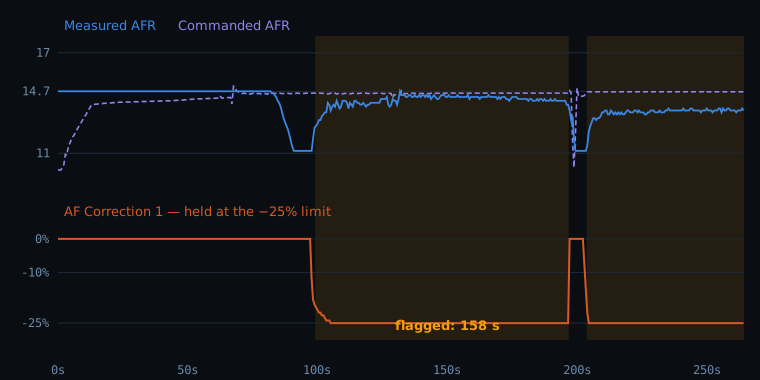
Real log excerpt: measured and commanded AFR above, fuel correction pinned at minus 25 percent below, flagged region shaded
Large negative fuel correction The ECU held its fuel correction at the −25% limit for 151 s. The flagged region is shaded on the graph.
A real log with the name, map and tuner removed. See the full finding
Reads logs from COBB Accessport Emtron Haltech coming
A real result

This is what you get back

A real 2006 Subaru WRX log, 4 minutes 24 seconds, with the owner, tune name and tuner removed. Nothing below was written by hand: it is the output of the same checks your log would go through.

Review
Large negative fuel correction detected, plus 1 other finding.No knock correction or DAM reduction was recorded in this log.
Measured and commanded AFR above, fuel correction below, flagged region shaded
Warning

Large negative fuel correction

The air/fuel correction reached −25.0% and stayed beyond −20% for 158 seconds, 60% of the time in the operating states this check looks at. That means the ECU was trying to remove a lot of fuel. It sat at exactly −25.00% for 151 seconds without moving, which is what hitting a limit looks like.

Lowest
−25%
Beyond −20%
158 s
Held at the limit
151 s
Confidence
High

Possible causes general information, not a diagnosis

  • Tune scaling that doesn't match the installed intake, MAF housing or injectors
  • Fuel pressure higher than the tune expects
  • A leaking or over-fueling injector
  • An exhaust leak ahead of the front AF sensor

Next steps

  • Log again fully warm, including coolant temperature, and compare
  • Share the log with your tuner
Every finding links to the exact stretch of the log, with the raw samples one click away.Check my own log free →
How it works

From a CSV to a clear answer in three steps

1

Upload your log

Drop the CSV straight from your Accessport. The vehicle, map and channels are read for you.

2

Tell us the setup

A few quick questions about fuel and what you were testing, so the checks match how the car was actually run.

3

Get the health check

A green, yellow or red verdict, plain-English findings, and the graph region behind each one.

What it checks

The things that hurt engines, checked the same way every time

Knock

Feedback and fine knock correction, learned timing pulled, and whether it clusters under load.

Boost control

Overboost, shortfall against target, and wastegate duty running out of authority.

Air / fuel

Measured against commanded, lean under load, with the AFR scale your logger reports.

Fuel trims and pressure

Trims pinned at a limit, and fuel pressure dropping when the engine needs it most.

No black box. Every verdict comes from fixed, published rules, not a model's opinion. The same log gives the same result, and every finding links to the evidence.

For tuners

Review customer logs without the evening of scrolling

Every log, one portal

Customer submissions land in a tuning session with a status, so nothing slips.

Rules you control

Each ECU has its own checks and thresholds, with your own presets on top.

Send maps safely

Upload a revision, confirm, and send. Your customer gets a secure link and the history stays intact.

Ready to find out?

Upload one log. It takes about a minute.

Check my log free →